A loose AA battery is a useful first exercise for learning a digital multimeter. You will measure voltage across two terminals. This is not a household outlet test, a mains-safety test, or an introduction to measuring current.
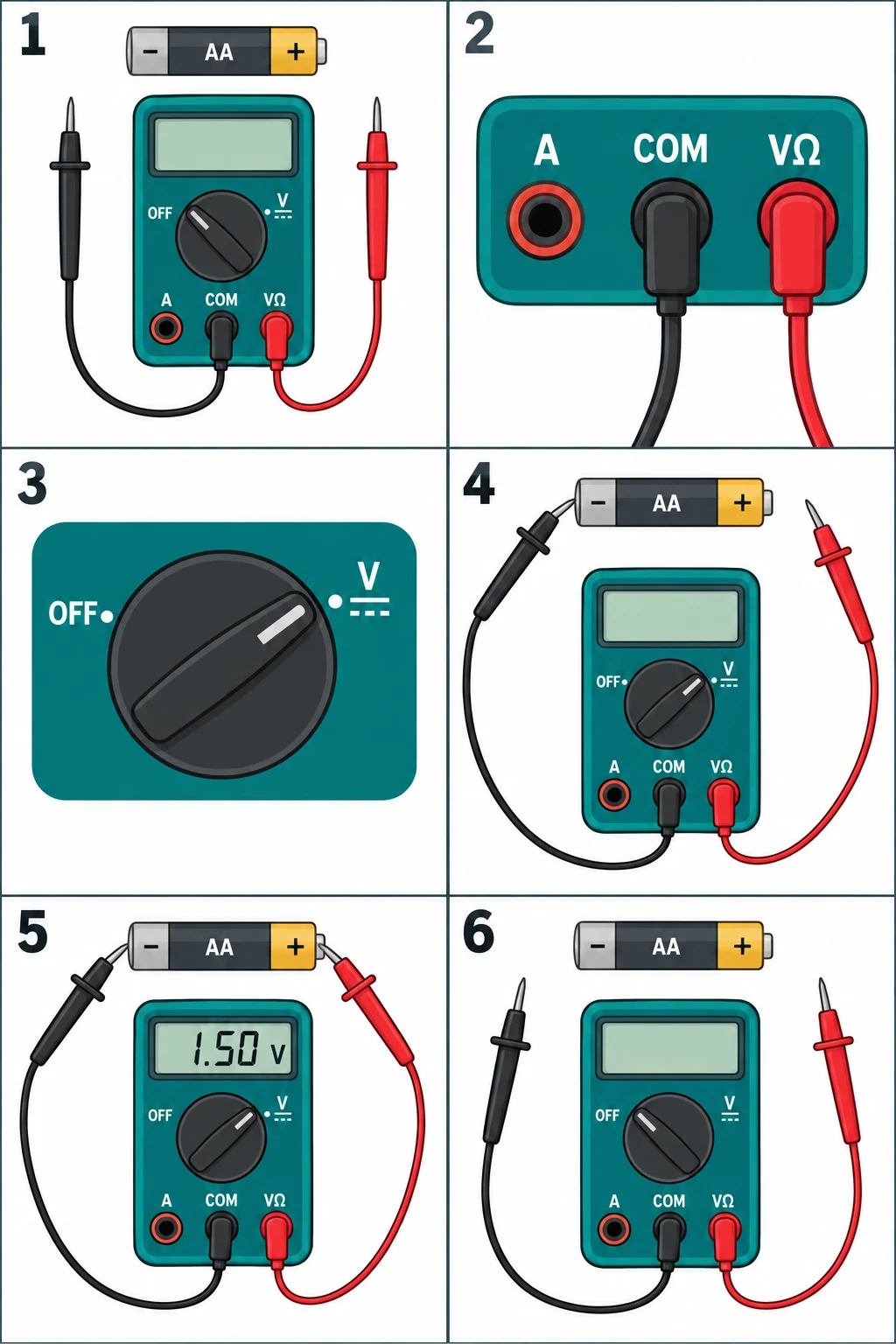
Put black in COM and red in V, select DC volts, touch black to battery minus and red to plus, and read the display.
Go straight to the stepsBefore you begin
Use only the loose low-voltage battery described here. Inspect the leads first. Never put the red lead in A or mA for this exercise: a current input placed across a source can short it.
What you’ll need
- Digital multimeter and its manual
- Intact insulated test leads
- An undamaged, loose 1.5 V AA alkaline battery
- Dry nonconductive work surface
Tools & supplies for this project
Affiliate disclosure: We may earn a commission when you buy through these Lowe’s links. How our links work.
Use what you already own. If you need supplies, compare these options with the requirements above and choose only the items your project needs.
Check Lowe’s for current price, availability and specifications.
Let’s do this
Step by step
- 01
Inspect and identify
Place the battery and meter on a dry surface. Check the battery’s label and plus/minus markings. Do not handle leaking or damaged batteries for this practice.
Open full-size image - 02
Use the voltage sockets
With probes away from the battery, plug black into COM and red into the input marked V or VΩ. Leave current sockets empty.
Open full-size image - 03
Select DC volts
Choose V with the straight/dashed DC symbol, not AC, resistance, continuity, or current. For a manual-range meter, choose a range above the battery’s expected 1.5 V, such as 2 V or 20 V where available.
Open full-size image - 04
Touch battery minus
Hold the black probe by its insulated grip, behind its finger guard, and place the tip on the battery’s flat negative end.
Open full-size image - 05
Touch plus and read
Put the red tip on the raised positive end without letting the probe tips touch. Read the voltage and unit. A minus sign normally indicates reversed probe polarity.
Example reading only; open-circuit voltage does not establish remaining battery life.Open full-size image - 06
Disconnect and switch off
Lift the red probe away, then the black. Switch the meter off and store the probes. Write down the battery type and reading if comparing several cells.
Open full-size image
Optional supplies on Amazon
Affiliate disclosure: As an Amazon Associate I earn from qualifying purchases. How our links work.
Use what you already have. These links open Amazon search results so you can compare suitable supplies; they are not individual product reviews.
Know what the sockets and symbols mean
COM is the common reference connection; V selects a voltage input. The A and mA sockets serve a different measurement setup. Use the meter’s own label and manual rather than relying on socket position in a drawing.
A voltage reading is not a complete battery-health test
This exercise takes an unloaded reading. It does not tell you how long the battery will run a particular device. Avoid turning a single number into a universal “good battery” rule; follow the device or battery tester’s instructions for that decision.
A quick final check
- Black is in COM and red is in V.
- The function is DC voltage.
- Probes are removed and the meter is off.
Common questions & sticking points
Why does the screen show OL?
Disconnect and check the selected function and range against the manual. An over-range reading is not a reason to move the red lead to A.
Can I try this on a wall outlet next?
No. Mains testing involves different hazards, equipment ratings, and training. This beginner exercise stays with a loose AA battery.
Sources & further reading Optional
References used to check this guide. Follow your product’s own safety instructions where its design differs.
- Fluke: Measuring DC voltage and avoiding the current-input mistake
- Fluke: Multimeter jacks, symbols, ranges, and display
- Energizer: Why unloaded voltage does not measure remaining service life